
7 Spring中的Bean的管理
学习目标
- 了解Spring IoC容器的原理
- 掌握Bean标签及其属性的使用
- 熟悉Bean的实例化
- 掌握Bean的作用域
- 掌握Bean的装配方式
- 熟悉Bean的生命周期
第6章详细讲解了控制反转和依赖注入。控制反转和依赖注入作为Spring的核心机制,改变了传统的编程习惯,组件的实例化不再由应用程序完成,而是交由Spring容器来管理,从而实现了组件之间依赖关系的解耦。控制反转和依赖注入均通过Bean实现,Bean是注册到Spring容器中的Java类,由Spring进行统一管理。
7.1 Spring IOC容器
Spring框架的主要功能是通过Spring容器来实现的,Spring容器可以管理开发者定义的各种Bean。Spring提供了相应的API来管理这些Bean,在Spring容器的API中,最常用的是 BeanFactory 和 ApplicationContext 这两个接口。
7.1.1 BeanFactory接口
BeanFactory 是Spring容器最基本的接口,其实现机制采用了经典的工厂模式。BeanFactory 提供了创建和管理Bean的方法,其常用方法如表7-1所示。
表7-1 BeanFactory接口的常用方法
| 方法名称 | 描述 |
|---|---|
getBean(String name) | 根据参数名称获取****Bean |
<T> T getBean(String name, Class<T> type) | 根据参数名称、参数类型获取Bean |
<T> T getBean(Class<T> requiredType) | 根据参数类型获取Bean |
Object getBean(String name, Object... args) | 根据参数名称获取Bean |
boolean isTypeMatch(String name, ResolvableType type) | 判断是否有与参数名称、参数类型匹配的Bean |
Class<?> getType(String name) | 根据****参数名称获取类型 |
String[] getAliases(String name) | 根据****实例的名称获取实例的别名数组 |
boolean containsBean(String name) | 根据****Bean的名称判断Spring容器是否含有指定的Bean |
表7-1列出了 BeanFactory 接口的常用方法,在开发过程中调用这些方法即可完成对Bean的操作。
Spring提供了多个 BeanFactory 接口的实现类,其中最常用的是 XmlBeanFactory,它可以读取XML配置文件,并根据配置信息生成BeanFactory 的实例,该实例用于管理Bean。
XmlBeanFactory 类读取XML文件并生成 BeanFactory 实例的语法格式如下:
BeanFactory beanFactory = new XmlBeanFactory(new FileSystemResource("D:/bean.xml"));
7.1.2 ApplicationContext接口
ApplicationContext 接口建立在 BeanFactory 接口的基础之上,扩展了 BeanFactory 的功能,例如增加了对国际化、资源访问、事件传播等方面的支持。
ApplicationContext 接口可以对单例Bean进行预初始化,并根据 <property> 元素执行setter方法,使得单例Bean可以直接使用,从而提升获取Bean实例的性能。
为了便于开发,Spring提供了几个常用的 ApplicationContext 接口实现类,具体如表7-2所示。
表7-2 常用的AplicationContext接口实现类
| 类名称 | 描述 |
|---|---|
ClassPathXmlApplicationContext | 从类路径加载配置文件,实例化ApplicationContext接口 |
FileSystemXmlApplicationContext | 从文件系统加载配置文件,实例化ApplicationContext接口 |
AnnotationConfigApplicationContext | 从注解中加载配置文件,实例化ApplicationContext接口 |
WebApplicationContext | 在Web应用中使用,从相对于Web根目录的路径中加载配置文件,实例化ApplicationContext接口 |
ConfigurableWebApplicationContext | 扩展了WebApplicationContext类,可以通过读取XML配置文件的方式实例化WebApplicationContext类 |
7.2 Bean的配置
Spring容器支持XML和Properties两种格式的配置文件,而在实际开发中最常用的是XML格式的配置文件。XML是一种标准的数据传输和存储格式,便于查看和操作数据。
在Spring中,XML配置文件的根元素是 <beans>,该元素可包含多个 <bean> 子元素,每个 <bean> 子元素定义一个Bean,通过 <bean> 元素可以将Bean注册到Spring容器中。
<bean> 元素提供了多个属性,其常用属性如表7-3所示。
表7-3**<bean>**元素中的常用属性
| 属性 | 描述 |
|---|---|
id | id属性是<bean>元素的唯一标识符,Spring容器对Bean的配置和管理通过id属性完成,装配Bean时也需要根据id值获取对象 |
name | name属性可以为Bean指定多个名称,每个名称之间用逗号或分号隔开 |
class | class属性可以指定Bean的具体实现类,其属性值为对象所属类的全路径 |
scope | scope属性用于设定Bean实例的作用范围,其属性值有singleton(单例)、prototype(原型)、request、session和global session |
<bean> 元素也包含多个子元素,其常用子元素如表7-4所示。
表7-4**<bean>**元素的常用子元素
| 元素 | 描述 |
|---|---|
<constructor-arg> | 使用<constructor-arg>元素可以为Bean的属性指定值,该元素有以下几个属性: · index:用于设置构造参数的序号 · type:用于指定构造参数类型 · ref:用于指定参数值 · value:用于指定参数值 此外,参数值也可以通过ref子元素或value子元素指定 |
<property> | <property>元素的作用是调用Bean实例中的setter方法完成属性赋值,从而完成依赖注入。<property>元素有以下几个属性: · name:指定Bean实例中的属性名 · ref:用于指定参数值 · value:用于指定参数值 |
ref | ref是<property>、<constructor-arg>等元素的属性,可用于指定Bean工厂中某个Bean实例的引用 |
value | value是<property>、<constructor-arg>等元素的属性,用于直接指定一个常量值 |
<list> | <list>元素是<property>等元素的子元素,用于指定Bean的属性类型为List或数组 |
<set> | <set>元素是<property>等元素的子元素,用于指定Bean的属性类型为set |
<map> | <map>元素是<property>等元素的子元素,用于指定Bean的属性类型为Map |
<entry> | <entry>元素是<map>元素的子元素,用于设定一个键值对。<entry>元素的key属性用于指定字符串类型的键;可用<entry>元素的ref或value子元素指定<entry>元素的值,也可通过value-ref或value属性指定<entry>元素的值 |
在XML配置文件中,一个普通的Bean通常只需定义 id(或 name)和 class 两个属性。在XML配置文件中定义Bean的代码如文件所示。
<?xml version="1.0" encoding="UTF-8"?>
<beans xmlns="http://www.springframework.org/schema/beans"
       xmlns:xsi="http://www.w3.org/2001/XMLSchema-instance"
       xsi:schemaLocation="http://www.springframework.org/schema/beans
                           http://www.springframework.org/schema/beans/spring-beans.xsd">

    <!-- 使用id属性定义bean1,其对应的实现类为com.itheima.Bean1 -->
    <bean id="bean1" class="com.itheima.Bean1"></bean>
    <!-- 使用name属性定义bean2,其对应的实现类为com.itheima.Bean2 -->
    <bean name="bean2" class="com.itheima.Bean2"/>

</beans>
在文件中,使用 id 属性定义了 bean1,并通过 class 属性指定了其对应的实现类为 com.itheima.Bean1;使用 name 属性定义了 bean2,并通过 class 属性指定了其对应的实现类为 com.itheima.Bean2。如果在Bean中未指定id 和name 属性,则Spring会将class 属性值作为默认的ID使用。
7.3 Bean的实例化
在面向对象程序设计中,若想使用某个对象,就需要先实例化该对象。同样地,在Spring中,若想使用容器中的Bean对象,也需要先将其进行实例化。实例化Bean有三种常见方式:构造方法实例化、静态工厂实例化和实例工厂实例化。
7.3.1 构造方法实例化
构造方法实例化是指Spring容器通过Bean对应类中的默认无参构造方法来创建Bean实例:
(1)创建Maven项目
创建一个名为ch7 的Maven项目,并在项目的 pom.xml 文件中配置所需的Spring基础包和依赖包:
<project xmlns="http://maven.apache.org/POM/4.0.0" xmlns:xsi="http://www.w3.org/2001/XMLSchema-instance"
         xsi:schemaLocation="http://maven.apache.org/POM/4.0.0 http://maven.apache.org/xsd/maven-4.0.0.xsd">
......
    <properties>
        <project.build.sourceEncoding>UTF-8</project.build.sourceEncoding>
        <spring.version>5.3.31</spring.version>
        <common.logging.version>1.2</common.logging.version>
    </properties>

    <dependencies>
        <dependency>
            <groupId>org.springframework</groupId>
            <artifactId>spring-core</artifactId>
            <version>${spring.version}</version>
        </dependency>
        <dependency>
            <groupId>org.springframework</groupId>
            <artifactId>spring-beans</artifactId>
            <version>${spring.version}</version>
        </dependency>
        <dependency>
            <groupId>org.springframework</groupId>
            <artifactId>spring-context</artifactId>
            <version>${spring.version}</version>
        </dependency>
        <dependency>
            <groupId>org.springframework</groupId>
            <artifactId>spring-expression</artifactId>
            <version>${spring.version}</version>
        </dependency>
        <dependency>
            <groupId>commons-logging</groupId>
            <artifactId>commons-logging</artifactId>
            <version>${common.logging.version}</version>
        </dependency>
    </dependencies>
</project>
(2)创建Bean类
在项目目录下创建 Bean1 类:
package io.weew12.github;

public class Bean1 {
    public Bean1() {
        System.out.println("这是Bean1");
    }
}
在文件自定义了默认的无参构造方法,当调用该构造方法时,会在控制台输出“这是Bean1”。
(3)配置XML文件
在项目新建 src/main/resources/applicationBean1.xml 文件作为 Bean1 类的配置文件,在该配置文件中定义一个ID为 bean1 的Bean,并通过 class 属性指定其实现类为 Bean1:
<?xml version="1.0" encoding="UTF-8"?>
<beans xmlns="http://www.springframework.org/schema/beans"
       xmlns:xsi="http://www.w3.org/2001/XMLSchema-instance"
       xsi:schemaLocation="http://www.springframework.org/schema/beans
      http://www.springframework.org/schema/beans/spring-beans.xsd">

    <bean id="bean1" class="io.weew12.github.Bean1"/>
</beans>
(4)测试类
在 创建测试类 Bean1Test,在其 main() 方法中通过加载 applicationBean1.xml 配置文件初始化Spring容器,再通过容器获取 Bean1 实例,验证构造方法是否成功实例化了Bean1:
package io.weew12.github;

import org.springframework.context.support.ClassPathXmlApplicationContext;

public class Bean1Test {
    public static void main(String[] args) {
        // 加载配置文件
        ClassPathXmlApplicationContext applicationContext = new ClassPathXmlApplicationContext("applicationBean1.xml");

        // 获取Bean实例
        Bean1 bean1 = applicationContext.getBean("bean1", Bean1.class);
        System.out.println(bean1);
    }
}
在IDEA中运行 Bean1Test 类,控制台输出结果如图所示。
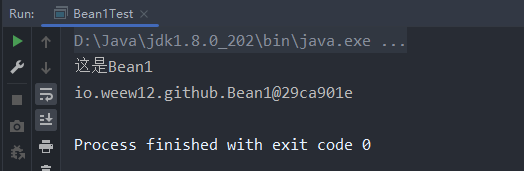
由图可知,控制台成功输出了“这是Bean1”,说明Spring容器成功调用了 Bean1 类的默认构造方法完成了Bean的实例化。
7.3.2 静态工厂实例化
使用静态工厂方式实例化Bean时,需要开发者定义一个静态工厂类,通过该类中的静态方法创建Bean实例。此时,Bean配置文件中的 class 属性不再指向Bean实例的实现类,而是指向静态工厂类。同时,还需使用 <bean> 元素的 factory-method 属性指定具体的静态工厂方法:
(1)创建Bean类
在项目创建 Bean2 类,其结构与 Bean1 类相似,仅包含一个默认构造方法:
package io.weew12.github;

public class Bean2 {
    public Bean2() {
        System.out.println("这是Bean2");
    }
}
(2)创建静态工厂类
在src/main/java/io/weew12/github/MyBean2Factory.java中创建 MyBean2Factory 类,在该类中定义一个静态方法 createBean() 用于创建Bean实例:
package io.weew12.github;

public class MyBean2Factory {
    // 工厂方法创建Bean2实例
    public static Bean2 createBean() {
        return new Bean2();
    }
}
(3)配置XML文件
在项目的 src/main/resources 目录下新建 applicationBean2.xml 文件作为 MyBean2Factory 类的配置文件:
<?xml version="1.0" encoding="UTF-8"?>
<beans xmlns="http://www.springframework.org/schema/beans"
       xmlns:xsi="http://www.w3.org/2001/XMLSchema-instance"
       xsi:schemaLocation="http://www.springframework.org/schema/beans
      http://www.springframework.org/schema/beans/spring-beans.xsd">

    <bean id="bean2" class="io.weew12.github.MyBean2Factory" factory-method="createBean"/>
</beans>
在文件中,定义了一个ID为 bean2 的Bean,通过 class 属性指定其实现类为 MyBean2Factory,并通过 factory-method 属性指定静态工厂方法为 createBean()。
(4)测试类
创建测试类 Bean2Test,用于测试静态工厂方式是否能成功实例化Bean:
package io.weew12.github;

import org.springframework.context.support.ClassPathXmlApplicationContext;

public class Bean2Test {
    public static void main(String[] args) {
        ClassPathXmlApplicationContext applicationContext = new ClassPathXmlApplicationContext("applicationBean2.xml");
        System.out.println(applicationContext.getBean("bean2", Bean2.class));
    }
}
在IDEA中运行 Bean2Test 类,控制台输出结果如图所示。
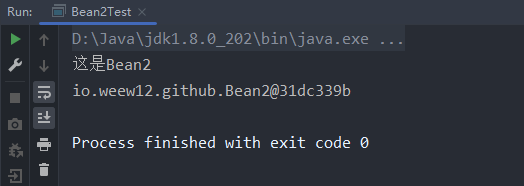
由图可知,控制台成功输出了“这是Bean2”,说明Spring容器成功使用静态工厂方法实例化了 Bean2。
7.3.3 实例工厂实例化
实例工厂实例化Bean是指通过已有的Bean工厂实例来创建新的Bean实例。在XML配置文件中,不再使用 class 属性直接指向Bean类,而是通过 factory-bean 属性指向配置好的工厂Bean,并使用 factory-method 属性指定要调用的工厂方法:
(1)创建Bean类
在项目创建 Bean3 类,其结构与 Bean1 类类似:
package io.weew12.github;

public class Bean3 {
    public Bean3() {
        System.out.println("这是Bean3");
    }
}
(2)创建实例工厂类
在src/main/java/io/weew12/github/MyBean3Factory.java中创建 MyBean3Factory 类,在该类中定义一个无参构造方法和一个 createBean() 方法用于创建 Bean3 对象:
package io.weew12.github;

public class MyBean3Factory {
    public MyBean3Factory() {
        System.out.println("bean3 实例化中");
    }

    /**
     * 创建bean3实例的方法
     *
     * @return Bean3
     */
    public Bean3 createBean() {
        return new Bean3();
    }
}
(3)配置XML文件
在项目的 src/main/resources 目录下新建 applicationBean3.xml 文件作为 MyBean3Factory 类的配置文件:
<?xml version="1.0" encoding="UTF-8"?>
<beans xmlns="http://www.springframework.org/schema/beans"
       xmlns:xsi="http://www.w3.org/2001/XMLSchema-instance"
       xsi:schemaLocation="http://www.springframework.org/schema/beans
      http://www.springframework.org/schema/beans/spring-beans.xsd">

    <!--    配置工厂  -->
    <bean id="myBean3Factory" class="io.weew12.github.MyBean3Factory"/>

    <!-- 使用factory-bean属性指向配置的实例工厂 -->
    <!-- 使用factory-method属性确定使用工厂中的哪个方法 -->
    <bean id="bean3" factory-bean="myBean3Factory" factory-method="createBean"/>
</beans>
在文件中,配置了一个工厂Bean;定义了一个ID为 bean3 的Bean,并通过 factory-bean 属性指向工厂Bean,使用 factory-method 属性指定要调用的工厂方法。
(4)测试类
创建测试类 Bean3Test,用于测试实例工厂方式是否能成功实例化Bean。Bean3Test 类代码如文件7-13所示。
package io.weew12.github;

import org.springframework.context.support.ClassPathXmlApplicationContext;

public class Bean3Test {
    public static void main(String[] args) {
        ClassPathXmlApplicationContext applicationContext = new ClassPathXmlApplicationContext("applicationBean3.xml");
        System.out.println(applicationContext.getBean("bean3", Bean3.class));
    }
}
在IDEA中运行 Bean3Test 类,控制台输出结果如图所示。
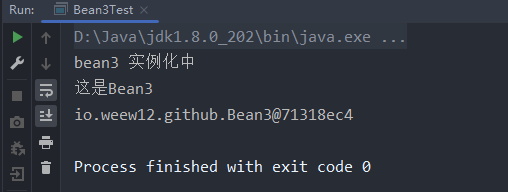
由图可知,使用实例工厂方式同样成功实例化了 Bean3。
7.4 Bean的作用域
Spring容器在创建Bean实例时,可以为其指定作用域。Bean的作用域是指Bean实例的有效范围。Spring为Bean定义了5种作用域,具体如表7-5所示。
表7-5 Spring支持的5种作用域
| 作用域名称 | 描述 |
|---|---|
singleton | 单例模式。在单例模式下,Spring容器中只会存在一个共享的Bean实例,所有对Bean的请求,只要请求的id(或name)与Bean的定义相匹配,就会返回Bean的同一个实例 |
prototype | 原型模式。每次从容器中请求Bean时,都会产生一个新的实例 |
request | 每一个HTTP请求都会有自己的Bean实例,该作用域只能在基于Web的Spring ApplicationContext中使用 |
session | 每一个HttpSession请求都会有自己的Bean实例,该作用域只能在基于Web的Spring ApplicationContext中使用 |
global session | 限定一个Bean的作用域为Web应用(HttpSession)的生命周期,只有在Web应用中使用Spring时,该作用域才有效 |
表7-5列出了Spring支持的5种作用域,其中 singleton 和 prototype 是最为常用的作用域。
7.4.1 singleton作用域
singleton 是Spring容器默认的作用域。当Bean的作用域为 singleton 时,Spring容器只为该Bean创建一个实例,该实例可以被重复使用。Spring容器负责管理Bean的整个生命周期,包括创建、初始化和销毁。由于创建和销毁Bean实例会带来一定的系统开销,因此使用 singleton 作用域能够有效避免资源浪费:
(1)修改配置文件
修改src/main/resources/applicationBean1.xml文件,将ID为 bean1 的Bean作用域设置为 singleton:
<?xml version="1.0" encoding="UTF-8"?>
<beans xmlns="http://www.springframework.org/schema/beans"
       xmlns:xsi="http://www.w3.org/2001/XMLSchema-instance"
       xsi:schemaLocation="http://www.springframework.org/schema/beans
      http://www.springframework.org/schema/beans/spring-beans.xsd">

    <bean id="bean1" class="io.weew12.github.Bean1" scope="singleton"/>
</beans>
(2)测试类
创建测试类 ScopeTest,在其 main() 方法中通过加载 applicationBean1.xml 初始化Spring容器,然后通过容器获取两个 Bean1 实例,判断它们是否为同一实例:
package io.weew12.github;

import org.springframework.context.support.ClassPathXmlApplicationContext;

public class ScopeTest {
    public static void main(String[] args) {
        ClassPathXmlApplicationContext applicationContext = new ClassPathXmlApplicationContext("applicationBean1.xml");

        Bean1 bean1 = applicationContext.getBean("bean1", Bean1.class);
        Bean1 bean2 = applicationContext.getBean("bean1", Bean1.class);

        System.out.println(bean1 == bean2);
    }
}
在IDEA中运行 ScopeTest 类,控制台输出结果如图所示。
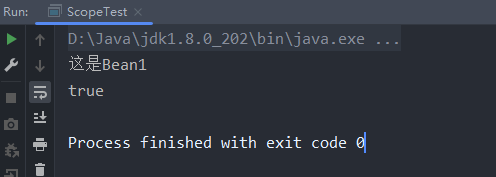
由图可知,控制台仅输出一次“这是Bean1”,并且在判断两个实例是否相等时输出了“true”,说明两个实例是同一个对象。由此可知,对于 singleton 作用域的Bean,每次请求都会返回同一个实例。
7.4.2 prototype作用域
当Bean的作用域为 prototype 时,每次对该Bean发起请求时,Spring容器都会创建一个新的实例。Spring容器只负责创建Bean实例,不再管理其生命周期。
在src/main/resources/applicationBean1.xml的基础上修改配置文件,将ID为 bean1 的Bean作用域设置为 prototype:
<?xml version="1.0" encoding="UTF-8"?>
<beans xmlns="http://www.springframework.org/schema/beans"
       xmlns:xsi="http://www.w3.org/2001/XMLSchema-instance"
       xsi:schemaLocation="http://www.springframework.org/schema/beans
      http://www.springframework.org/schema/beans/spring-beans.xsd">

    <bean id="bean1" class="io.weew12.github.Bean1" scope="prototype"/>
</beans>
在文件中,将 <bean> 元素的 scope 属性值修改为 prototype,表示Bean的作用域为原型模式。
再次运行 ScopeTest 类,控制台输出结果如图所示。
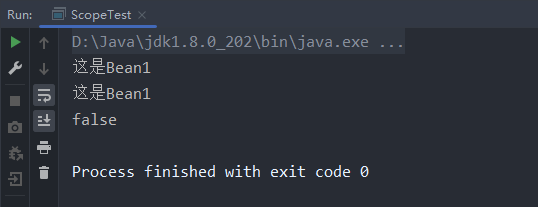
由图可知,控制台输出了两次“这是Bean1”,并且两个实例的比较结果为“false”,说明通过Spring容器获取的两个 Bean1 实例并不是同一个对象。由此可知,对于 prototype 作用域的Bean,每次请求都会返回一个新的实例。
7.5 Bean的装配方式
Bean的装配即依赖注入。Spring容器提供了三种常用的Bean装配方式:基于XML的装配、基于注解的装配和自动装配。
7.5.1 基于XML的装配
基于XML的装配是指通过读取XML配置文件中的信息完成依赖注入。Spring容器提供了两种基于XML的装配方式:属性setter方法注入和构造方法注入。
1. 属性setter方法注入
在Spring实例化Bean的过程中,首先会调用Bean的默认构造方法创建Bean对象,然后通过反射调用setter方法注入属性值。因此,使用属性setter方法注入时,Bean类需要满足以下两个条件:
- 提供一个默认的无参构造方法;
- 为需要注入的属性提供对应的setter方法。
在第6.3.3节中已经使用XML方式装配过Bean,这里不再详细讲解。需要注意的是,在Spring配置文件中使用属性setter方法注入时,需要使用 <bean> 元素的子元素 <property> 来为每个属性注入值:
<?xml version="1.0" encoding="UTF-8"?>
<beans xmlns="http://www.springframework.org/schema/beans"
       xmlns:xsi="http://www.w3.org/2001/XMLSchema-instance"
       xsi:schemaLocation="http://www.springframework.org/schema/beans
      http://www.springframework.org/schema/beans/spring-beans.xsd">
    <bean id="user2" class="io.weew12.github.User2">
        <property name="id" value="2"/>
        <property name="name" value="weew13"/>
        <property name="password" value="456"/>
    </bean>
</beans>
2. 构造方法注入
使用构造方法注入时,在配置文件中需要使用 <bean> 元素的子元素 <constructor-arg> 来定义构造方法的参数,可以使用其 value 属性(或子元素)来设置参数值。示例如下:
<?xml version="1.0" encoding="UTF-8"?>
<beans xmlns="http://www.springframework.org/schema/beans"
       xmlns:xsi="http://www.w3.org/2001/XMLSchema-instance"
       xsi:schemaLocation="http://www.springframework.org/schema/beans
      http://www.springframework.org/schema/beans/spring-beans.xsd">
    <bean id="user1" class="io.weew12.github.User1">
        <constructor-arg name="id" value="1"></constructor-arg>
        <constructor-arg name="name" value="张三"></constructor-arg>
        <constructor-arg name="password" value="123"></constructor-arg>
    </bean>
</beans>
在第6.3.3节中已详细讲解了基于XML的Bean装配过程,此处不再赘述。
7.5.2 基于注解的装配
虽然使用XML配置文件可以实现Bean的装配,但在实际开发中,如果Bean数量较多,会导致XML配置文件过于臃肿,增加后期维护难度。为此,Spring提供了注解方式来简化Bean的装配。
Spring支持多种注解,常用的如表7-6所示。
表7-6 Spring常用的注解
| 注解 | 描述 |
|---|---|
@Component | 指定一个普通的Bean,可以作用在任何层次 |
@Controller | 指定一个控制器组件Bean,用于将控制层的类标识为Spring中的Bean,功能上等同于@Component |
@Service | 指定一个业务逻辑组件Bean,用于将业务逻辑层的类标识为Spring中的Bean,功能上等同于@Component |
@Repository | 指定一个数据访问组件Bean,用于将数据访问层的类标识为Spring中的Bean,功能上等同于@Component |
@Scope | 指定Bean实例的作用域 |
@Value | 指定Bean实例的注入值 |
@Autowired | 指定要自动装配的对象 |
@Resource | 指定要注入的对象 |
@Qualifier | 指定要自动装配的对象名称,通常与@Autowired联合使用 |
@PostConstruct | 指定Bean实例完成初始化后调用的方法 |
@PreDestroy | 指定Bean实例销毁前调用的方法 |
表7-6列出了Spring常用的注解。需要注意的是,虽然 @Controller、@Service 和 @Repository 注解的功能与 @Component 注解相同,但为了明确类的用途,建议在实际开发中分别使用它们来标注控制器、服务层和数据访问层的组件。
下面通过一个案例演示如何使用注解装配Bean。
(1)导入依赖
在项目 pom.xml 文件中导入 spring-aop 依赖包,代码如下:
        <dependency>
            <groupId>org.springframework</groupId>
            <artifactId>spring-aop</artifactId>
            <version>${spring.version}</version>
        </dependency>
(2)创建XML配置文件
在项目的 src/main/resources 目录下创建 applicationContext.xml 文件,在该文件中引入Context约束并启用Bean的自动扫描功能:
<?xml version="1.0" encoding="UTF-8"?>
<beans xmlns="http://www.springframework.org/schema/beans"
       xmlns:xsi="http://www.w3.org/2001/XMLSchema-instance"
       xmlns:context="http://www.springframework.org/schema/context"
       xsi:schemaLocation="http://www.springframework.org/schema/beans
      http://www.springframework.org/schema/beans/spring-beans.xsd http://www.springframework.org/schema/context https://www.springframework.org/schema/context/spring-context.xsd">

    <!-- 开启注解扫描 -->
    <context:component-scan base-package="io.weew12.github"/>
</beans>
在文件中,代码引入了Context约束;开启了Spring中Bean的自动扫描功能。
(3)定义实体类
在项目新建 entity 包,在该包中创建 User 实体类:
package io.weew12.github.entity;

import org.springframework.beans.factory.annotation.Value;
import org.springframework.context.annotation.Scope;
import org.springframework.stereotype.Component;

@Component("user")
@Scope("singleton")
public class User {
    @Value("1")
    private int id;
    @Value("weew12")
    private String name;
    @Value("123")
    private String password;

    public int getId() {
        return id;
    }

    public void setId(int id) {
        this.id = id;
    }

    public String getName() {
        return name;
    }

    public void setName(String name) {
        this.name = name;
    }

    public String getPassword() {
        return password;
    }

    public void setPassword(String password) {
        this.password = password;
    }

    @Override
    public String toString() {
        return "User{" +
                "id=" + id +
                ", name='" + name + '\'' +
                ", password='" + password + '\'' +
                '}';
    }
}
在文中使用 @Component 注解将 User 类注册为Spring容器中的Bean;使用 @Scope 注解指定其作用域为单例;使用 @Value 注解分别为 id、name 和 password 属性注入值。
(4)定义DAO层
在项目的下创建 dao 包,在该包中创建 UserDao 接口,并声明 save() 方法:
package io.weew12.github.dao;

public interface UserDao {
    void save();
}
(5)实现DAO层
在项目的 dao 包中创建 UserDaoImpl 类作为 UserDao 的实现类,并实现 save() 方法:
package io.weew12.github.dao;

import io.weew12.github.entity.User;
import org.springframework.beans.factory.annotation.Qualifier;
import org.springframework.context.support.ClassPathXmlApplicationContext;
import org.springframework.stereotype.Repository;

@Repository("userDao")
public class UserDaoImpl implements UserDao {
    @Override
    public void save() {
        ClassPathXmlApplicationContext applicationContext = new ClassPathXmlApplicationContext("applicationContext.xml");
        User user = applicationContext.getBean("user", User.class);
        System.out.println(user);
        System.out.println("执行UserDaoImpl.save()方法");
    }
}
在文件中,使用 @Repository 注解将 UserDaoImpl 类标识为Spring中的Bean;代码加载配置文件并获取Bean实例,打印相关信息。
(6)定义Service层
在项目的下新建 service 包,在该包中创建 UserService 接口,并定义 saveService 方法:
package io.weew12.github.service;

public interface UserService {
    void saveService();
}
(7)实现Service层
在项目的 service 包中创建 UserServiceImpl 类作为 UserService 的实现类,并实现 saveService 方法:
package io.weew12.github.service;

import io.weew12.github.dao.UserDao;
import org.springframework.stereotype.Service;

import javax.annotation.Resource;

@Service("userService")
public class UserServiceImpl implements UserService {
    @Resource(name = "userDao")
    private UserDao userDao;

    @Override
    public void saveService() {
        userDao.save();
        System.out.println("执行UserServiceImpl.save()");
    }
}
在文件中,使用 @Service 注解将 UserServiceImpl 类标识为Spring中的Bean;使用 @Resource 注解注入 UserDao;实现了 saveService() 方法。
(8)定义Controller层
在项目的下新建 controller 包,在该包中创建 UserController 类作为控制层:
package io.weew12.github.controller;

import io.weew12.github.service.UserService;
import org.springframework.stereotype.Controller;

import javax.annotation.Resource;

@Controller
public class UserController {
    @Resource(name = "userService")
    private UserService userService;

    public void save() {
        userService.saveService();
        System.out.println("执行UserController.save()");
    }
}
在文件中,使用 @Controller 注解将 UserController 类标识为Spring中的Bean;使用 @Resource 注解注入 UserService;实现了 save() 方法。
(9)测试类
创建测试类 AnnotationTest,在其 main() 方法中通过Spring容器加载配置文件并获取 UserController 实例,然后调用其 save() 方法:
package io.weew12.github;

import io.weew12.github.controller.UserController;
import org.springframework.context.support.ClassPathXmlApplicationContext;

public class AnnotationTest {
    public static void main(String[] args) {
        ClassPathXmlApplicationContext applicationContext = new ClassPathXmlApplicationContext("applicationContext.xml");
        UserController userController = applicationContext.getBean("userController", UserController.class);
        userController.save();
    }
}
在IDEA中运行 AnnotationTest 类,控制台输出结果如图所示。
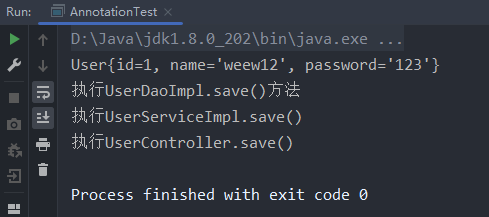
由图可知,Spring容器成功获取了 UserController 实例,并通过调用其方法执行了各层的输出语句,说明Spring容器已基于注解完成了Bean的装配。
7.5.3 自动装配
除了使用XML和注解方式装配Bean之外,Spring还提供了自动装配功能。在 <bean> 元素中有一个 autowire 属性,可以通过设置该属性值来实现Bean的自动装配。
autowire 属性的可选值如表7-7所示。
表7-7**autowire**属性的值
| 属性值 | 描述 |
|---|---|
default | 由<bean>的上级元素<beans>的default-autowire属性值确定。例如,<beans default-autowire="byName">,则<bean>元素中的autowire属性对应的属性值就为byName |
byName | 根据<bean>元素id属性的值自动装配 |
byType | 根据<bean>元素的数据类型(Type)自动装配,如果一个Bean的数据类型兼容另一个Bean中的数据类型,则自动装配 |
constructor | 根据构造函数参数的数据类型进行byType模式的自动装配 |
no | 默认值,不使用自动装配,Bean依赖必须通过<ref>元素或ref属性定义 |
下面通过修改第6.3.4节中的案例来演示Bean的自动装配功能。修改后的 applicationContext.xml 文件代码如下:
<?xml version="1.0" encoding="UTF-8"?>
<beans xmlns="http://www.springframework.org/schema/beans"
       xmlns:xsi="http://www.w3.org/2001/XMLSchema-instance"
       xsi:schemaLocation="http://www.springframework.org/schema/beans
      http://www.springframework.org/schema/beans/spring-beans.xsd">

    <bean id="userDao" class="io.weew12.github.dao.Impl.UserDaoImpl"/>
    <bean id="userService" class="io.weew12.github.service.Impl.UserServiceImpl" autowire="byName"/>
</beans>
上述配置文件在 <bean> 元素中增加了 autowire 属性,并将其值设为 byName。此时Spring会自动查找与Bean ID相同的属性名,并进行匹配。也就是说,Spring会自动查找名为 userDao 的属性,并将其与ID为 userDao 的Bean进行匹配。
重新运行第6.3.4节的案例,控制台输出结果如图所示。
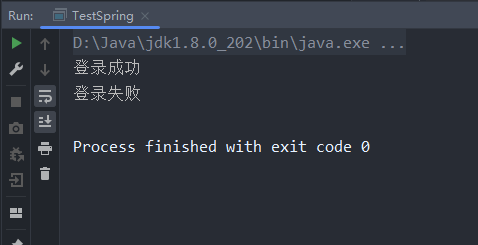
由图说明使用自动装配方式同样可以完成Bean的装配。
7.6 Bean的生命周期
Bean的生命周期是指Bean实例从创建、初始化到销毁的全过程。在不同作用域下,Spring容器对Bean生命周期的管理方式有所不同。对于 singleton 作用域的Bean,Spring容器负责管理其完整的生命周期;而对于 prototype 作用域的Bean,Spring容器只负责创建实例,不再管理其生命周期。
在Bean的生命周期中,有两个关键的时间节点:初始化完成后和销毁之前。在这两个时间点通常需要执行特定的操作,因此常需要对其进行监控。监控方式有两种:使用XML配置文件或使用注解。由于注解使用更简洁,下面通过注解方式演示如何监控Bean的初始化和销毁节点。
Spring容器提供了 @PostConstruct 注解用于标记初始化方法,@PreDestroy 注解用于标记销毁前的方法:
(1)创建Bean类
在项目的包中创建 Student 类,在该类中定义 id 和 name 字段,并使用 @PostConstruct 指定初始化方法,使用 @PreDestroy 指定销毁前的方法:
package io.weew12.github;

import org.springframework.beans.factory.annotation.Value;
import org.springframework.stereotype.Component;

import javax.annotation.PostConstruct;
import javax.annotation.PreDestroy;

@Component("student")
public class Student {
    @Value("1")
    private String id;
    @Value("weew12")
    private String name;

    public String getId() {
        return id;
    }

    public void setId(String id) {
        this.id = id;
    }

    public String getName() {
        return name;
    }

    public void setName(String name) {
        this.name = name;
    }

    @PostConstruct
    public void init() {
        System.out.println("Bean的初始化完成,调用init()方法");
    }

    @PreDestroy
    public void destroy() {
        System.out.println("Bean销毁前调用destroy()方法");
    }

    @Override
    public String toString() {
        return "Student{" +
                "id='" + id + '\'' +
                ", name='" + name + '\'' +
                '}';
    }
}
在文件中,使用 @PostConstruct 标注 init() 方法为初始化回调方法;使用 @PreDestroy 标注 destroy() 方法为销毁前回调方法。
(2)创建XML配置文件
在项目的 src/main/resources 目录下创建 applicationStudent.xml 文件,在该文件中引入Context约束并启用Bean的自动扫描功能:
<?xml version="1.0" encoding="UTF-8"?>
<beans xmlns="http://www.springframework.org/schema/beans"
       xmlns:xsi="http://www.w3.org/2001/XMLSchema-instance"
       xmlns:context="http://www.springframework.org/schema/context"
       xsi:schemaLocation="http://www.springframework.org/schema/beans
      http://www.springframework.org/schema/beans/spring-beans.xsd http://www.springframework.org/schema/context https://www.springframework.org/schema/context/spring-context.xsd">

    <context:component-scan base-package="io.weew12.github"/>

</beans>
(3)测试类
创建测试类 StudentTest,在其 main() 方法中通过Spring容器加载配置文件并获取 Student 实例:
package io.weew12.github;

import org.springframework.context.support.AbstractApplicationContext;
import org.springframework.context.support.ClassPathXmlApplicationContext;

public class StudentTest {
    public static void main(String[] args) {
        ClassPathXmlApplicationContext applicationContext = new ClassPathXmlApplicationContext("applicationStudent.xml");
        Student student = applicationContext.getBean("student", Student.class);
        System.out.println(student);

        AbstractApplicationContext abstractApplicationContext = applicationContext;
        // 注册关闭钩子,确保容器关闭时调用destroy方法
        abstractApplicationContext.registerShutdownHook();
    }
}
在文件中,调用了 AbstractApplicationContext 类的 registerShutdownHook() 方法,以确保在容器关闭时调用Bean的销毁方法。
(4)运行测试
在IDEA中运行 StudentTest 类,控制台输出结果如图所示。
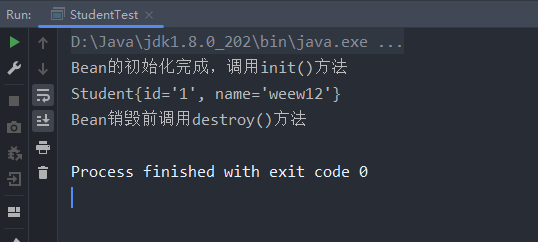
由图可知,控制台输出了“Bean的初始化完成,调用init()方法”和“Bean销毁前调用destroy()方法”的信息,说明程序成功调用了初始化和销毁方法。
7.7 本章小结
本章主要讲解了Spring对Bean的管理。首先介绍了Spring IoC容器,包括 BeanFactory 和 ApplicationContext 接口;其次讲解了Bean的两种配置方式:属性setter方法注入和构造方法注入;接着讲解了Bean的三种实例化方式:构造方法实例化、静态工厂实例化和实例工厂实例化;然后讲解了Bean的作用域,包括 singleton 和 prototype;最后讲解了Bean的三种装配方式:基于XML的装配、基于注解的装配和自动装配,并介绍了Bean的生命周期。通过学习本章内容,可以对Spring中Bean的管理机制有基本的了解。
【思考题】
1. 请简述XML配置文件的根元素 <beans> 中的常用元素及其作用
在Spring框架中,<beans>是XML配置文件的根元素,它包含了多个子元素,每个子元素都有其特定的功能和用途。以下是几个常用的子元素及其主要功能:
<bean>:这是最核心的一个元素,用于定义一个Bean对象。通过这个标签可以指定类名、id(或name)、作用域等属性,并且还可以设置依赖注入的信息。<import>:允许从其他XML配置文件导入额外的Bean定义。这对于大型项目来说非常有用,因为它可以帮助组织和管理复杂的配置信息。<alias>:为已存在的Bean创建别名。这在需要以不同名称引用同一个Bean时特别有用。<description>和<meta>:这两个元素分别用来添加描述信息和元数据到Bean定义中。虽然它们不是必需的,但对于文档化你的配置非常有帮助。<constructor-arg>和<property>:这些元素用于设置Bean构造函数参数或属性值。<constructor-arg>用于传递给构造方法的参数,而<property>则用于设置Bean实例的属性。<lookup-method>和<replaced-method>:这两个元素提供了更高级的功能,比如动态选择具体实现或者替换方法的行为,适用于需要高度定制化场景下的使用。
2. 请简述Bean的几种装配方式的基本用法
Spring框架支持多种方式来装配Bean之间的关系,主要包括以下几种:
- 基于XML的装配:这是最早的也是最基本的方式之一,通过XML配置文件中的
<bean>标签以及<property>或<constructor-arg>子标签来明确指定哪些Bean应该被注入到另一个Bean中作为属性或构造参数。这种方式直观但灵活性较差。 - 基于注解的装配:随着Java SE 5引入了注解特性后,Spring也支持了利用如
@Autowired、@Resource等注解来进行自动装配。开发者只需在需要注入的地方加上相应的注解即可,无需再手动编写大量的XML配置代码。这种方式更加简洁易读,同时也提高了开发效率。 - 基于Java的装配:除了传统的XML配置外,Spring还提供了基于Java代码的方式来配置应用上下文。通过
@Configuration注解标记的类里定义带有@Bean注解的方法,这些方法将返回新创建的对象实例。这种方法结合了类型安全性和IDE支持的优势,使得错误能够在编译阶段就被发现。 - 自动装配:Spring还支持一种特殊的装配模式——自动装配,即让容器根据某些规则(如按类型匹配)自动地完成Bean之间的连接工作。可以通过设置
<bean>标签上的autowire属性来启用此功能。尽管方便,但在大型项目中可能会导致难以追踪的问题,因此需谨慎使用。
以上就是关于Spring框架中XML配置文件内常见元素的作用介绍以及几种典型的Bean装配方式概述。每种方式都有其适用场景及优缺点,在实际开发过程中应根据具体情况灵活选用。